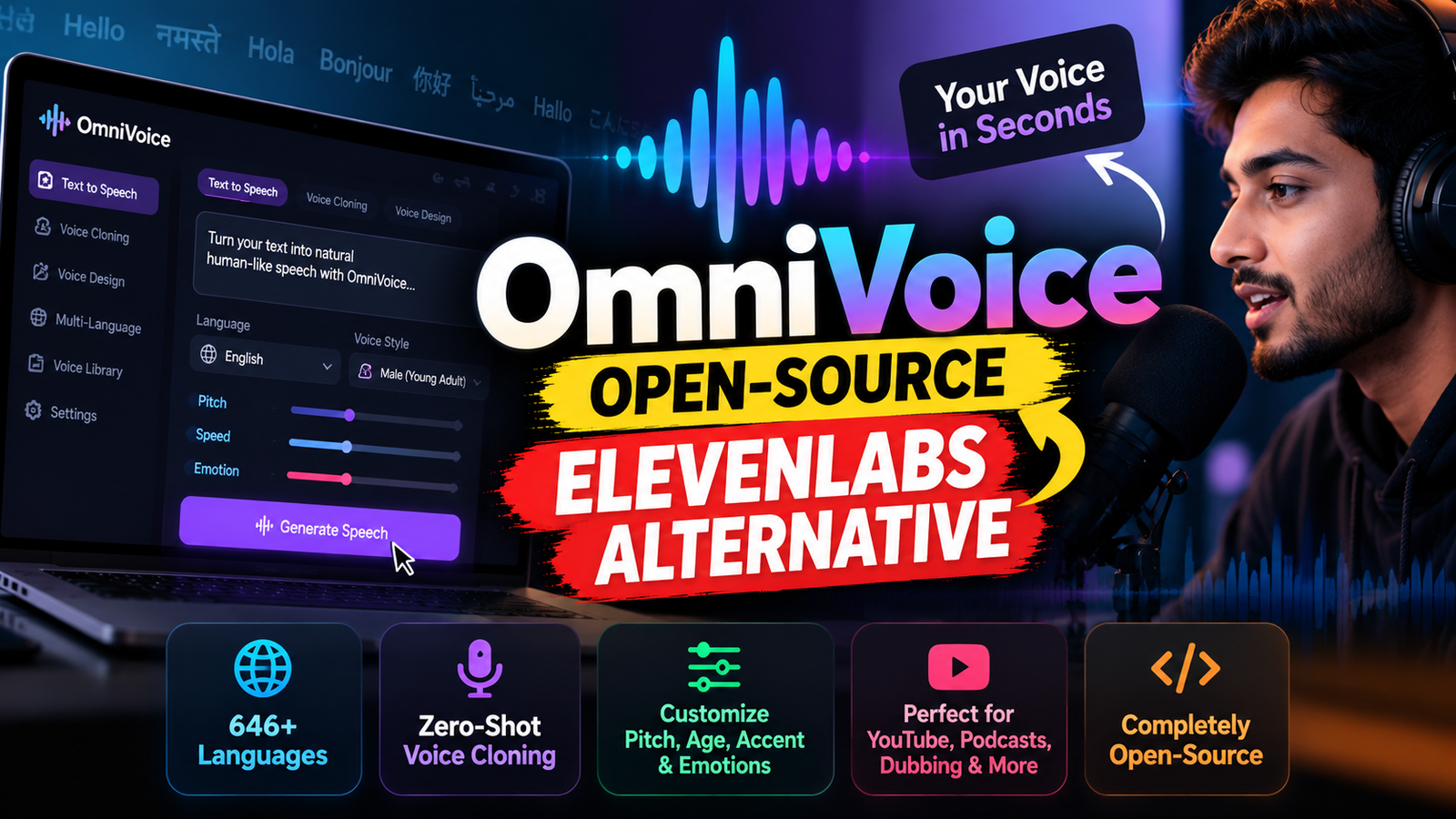
Looking for an alternative to ElevenLabs? OmniVoice can generate AI speech, clone a voice from a short recording, and create custom voices across hundreds of languages. Here’s how to try it online or run it on your own computer.
Imagine writing a script, uploading a short recording of your voice, and generating a new voiceover without recording every sentence yourself. That’s the idea behind OmniVoice, an AI text-to-speech project designed for multilingual speech generation and zero-shot voice cloning.
The project has attracted attention because its published model supports more than 600 languages, offers voice-design controls, and makes its code and model weights publicly available. Its online interface advertises support for 646 languages. However, the hosted website and the self-hosted model have different costs, so it is important to understand the difference before calling it completely free.
What Is OmniVoice?
OmniVoice is an AI text-to-speech (TTS) model developed by the k2-fsa research team. It converts written text into spoken audio and can generate speech conditioned on a short reference recording.
Its main capabilities include:
- AI voice cloning: Generate new speech resembling a voice in a reference recording.
- Multilingual speech: The project advertises support for 646 languages.
- Voice design: Describe a voice using attributes such as gender, age, pitch, accent, and style.
- Cross-language voice generation: Use a reference voice to generate speech in another supported language.
- Speech controls: Work with pronunciation guidance and supported non-verbal cues, such as laughter.
The key feature is zero-shot voice cloning. Unlike approaches that require training a dedicated model on hours of recordings, OmniVoice can use a short reference clip without a separate fine-tuning process. Results still depend on the recording quality, language, and the model’s capabilities.
Is OmniVoice Really Free?
The model is open source, but the hosted online service is not unlimited and free forever.
There are two main ways to use it:
| Method | Cost and requirements |
|---|---|
| Online generator | Convenient, with a limited amount of free trial usage |
| Self-hosted model | No hosted-generation credits required, but you need compatible hardware and may incur electricity or cloud-computing costs |
At the time of writing, OmniVoice’s hosted website advertises two free trial credits, equivalent to approximately 200 characters or 16 seconds of generated speech. Additional generation requires purchasing credits.
The core model’s source repository is publicly available under an open-source licence. Running it yourself can avoid the hosted service’s credit limits, but the initial installation is more technical and generation speed depends on your hardware.
10 chatgpt tricks for students- https://techiemakra.com/10-chatgpt-tricks-every-college-student-should-know/
10 chatgpt tricks for programmer- https://techiemakra.com/10-chatgpt-tricks-every-programmer-should-know/
90% cheaper model by Anthropic- https://techiemakra.com/claude-haiku-5-5-launched-anthropics-new-ai-model-is-up-to-90-cheaper/
youtube automation is now free- https://techiemakra.com/youtube-automation-is-now-free-run-your-entire-channel-with-ai-full-setup-guide/
how to make chatgpt honest- https://techiemakra.com/how-to-make-chatgpt-give-you-honest-and-critical-answers/
what is ASD-STE100 prompting- https://techiemakra.com/what-is-asd-ste100-prompting-the-simple-guide-to-writing-better-ai-prompts/
How to Generate an AI Voice With OmniVoice Online
This is the easiest method if you do not want to install Python or configure a local AI model.
Step 1: Open OmniVoice
Visit the official online generator:
Look for the text-to-speech, voice-cloning, or voice-design option. The available controls may change as the website is updated.
Step 2: Enter Your Script
Write or paste the text you want to convert into speech. For example:
“Welcome back to the channel. Today, we’re exploring an AI tool that can change the way you create videos.”
For better results, use clear punctuation and split long scripts into manageable sections.
Step 3: Choose Your Voice Generation Method
OmniVoice offers two particularly useful approaches:
Option A: Voice cloning
Upload a clean recording of the voice you want to reproduce. The website advertises reference clips as short as three seconds, although a longer, clear recording can provide more useful voice information.
Use your own recording or a voice you have explicit permission to clone.
Option B: Voice design
Create a voice from a text description without uploading a reference recording. Depending on the available interface, you can specify characteristics such as:
- Gender and approximate age
- Low, medium, or high pitch
- Supported accent
- Style, such as whispering
For example, a voice description could be: “Male, young adult, low pitch, Indian English accent.”
The generated result may not perfectly match every requested characteristic, so experiment with different descriptions.
Step 4: Generate and Preview the Speech
Click the generation control and listen to the result. Check pronunciation, pacing, pauses, and whether the voice sounds appropriate for your script.
If a word sounds unnatural, try rewriting the sentence, adding punctuation, or using supported pronunciation controls.
Step 5: Download Your Audio
Once you are satisfied with the result, use the download option available in the interface. The website advertises MP3 and WAV exports.
You can then import the audio into Premiere Pro, DaVinci Resolve, CapCut, or another video editor.
Important: The hosted website’s free trial is limited. If you plan to generate voiceovers regularly, check its current credit system or consider running the open-source model locally.
How to Run OmniVoice on Your Own Computer
If you want to experiment without relying on hosted-generation credits, the core OmniVoice project can be installed locally. This method is intended for users who are comfortable with basic Python setup.
Requirements
You will need:
- Python and pip
- A compatible operating system and PyTorch installation
- Sufficient RAM and storage for the model and its dependencies
- A supported GPU for faster generation, if available
CPU execution may be possible, but it can be considerably slower. Hardware requirements depend on the model configuration and the amount of memory available.
Step 1: Install PyTorch
Follow the official PyTorch installation guide and choose the command that matches your operating system and hardware.
Do not copy a CUDA-specific installation command unless your system supports that configuration.
Step 2: Install OmniVoice
Open a terminal in your Python environment and run:
pip install omnivoiceAlternatively, the project documents installation directly from its GitHub repository. See the official installation instructions if you need the latest setup details.
Step 3: Launch the Local Web Interface
The repository documents a demo command for launching a local interface:
omnivoice-demo --ip 127.0.0.1 --port 8001If the command starts successfully, open this address in your browser:
http://127.0.0.1:8001
The application may need to download pretrained model files on its first run. Installation steps and dependencies can change, so consult the repository if you encounter an error.
Step 4: Generate Speech
Use the local interface to select a generation mode, enter your text, and provide a reference recording if you want to clone a voice. Preview the audio and save the result.
For programmatic usage, the project also provides a Python API and examples in its GitHub documentation.
OmniVoice vs. ElevenLabs: Which One Should You Choose?
OmniVoice is an interesting alternative, but the two products are not identical.
| Feature | OmniVoice | ElevenLabs |
|---|---|---|
| Language coverage | Advertises 646 languages | Depends on the selected model |
| Voice cloning | Zero-shot cloning | Voice cloning options vary by plan and product |
| Custom voice design | Text-based voice attributes | Offers its own voice-generation tools |
| Self-hosting | Core model can be run locally | Primarily a hosted platform |
| Ease of use | Online interface or technical local setup | Polished hosted workflow |
OmniVoice’s research paper reports results on multilingual speech benchmarks, but benchmark performance does not establish that it will sound better than ElevenLabs for every voice, language, or type of content.
If you want a straightforward hosted workflow and established production tools, compare both platforms using your own script. If open-source access, experimentation, and self-hosting matter more, OmniVoice is worth exploring.
Where Can You Use OmniVoice?
AI speech generation can be useful for several types of content:
- Faceless YouTube videos: Generate narration for explainers, documentaries, and educational videos.
- Short-form content: Create voiceovers for Instagram Reels and YouTube Shorts.
- Audiobooks: Experiment with narration for stories and written material.
- Dubbing and localisation: Generate speech in other supported languages, subject to quality checks.
- Podcasts: Produce draft narration, intros, and other recorded segments.
- Prototypes and voice agents: Test speech-generation workflows in applications.
These are possible use cases, not a guarantee that the tool includes every production feature natively. Video dubbing, timing, and voice-agent integrations may require separate software or development work.
Is It Safe to Clone Your Own Voice?
Voice cloning can reproduce characteristics of a person’s speech, so privacy and consent matter.
Use recordings you own or have permission to use. Do not clone another person’s voice to impersonate them, mislead viewers, or create fraudulent audio. Before uploading a private recording, review the service’s privacy policy and understand how the audio is processed.
If you are using the local model, verify that the configuration really runs locally before assuming your recordings never leave your device.
Final Verdict
OmniVoice is a genuine open-source AI speech project with multilingual text-to-speech, zero-shot voice cloning, and voice-design capabilities. Its advertised 646-language coverage and ability to work from short reference clips make it worth testing for creators who regularly produce voiceovers.
The biggest caveat is the meaning of “free”: the hosted website offers limited trial credits, while running the model yourself requires installation and computing resources.
For beginners, start with the online generator. If you need more control and want to avoid hosted-generation credits, explore the official repository and local installation guide.
Try it here: OmniVoice Online | Official GitHub Repository
This article was prepared using the project’s published documentation and website information available on October 21, 2026. Features, pricing, and installation requirements may change.